

Blog
  • Beginner’s Guides
  • Digital Marketing
  • SEO Professionals
  • Web Development
  • Accessibility
  • Testing
Reading: Google Gemini 3.5 Flash Just Built a Classic PC Drawing App In One Single Prompt
Share
BlogBlog
Font ResizerAa
  • Complaint
  • Complaint
  • Advertise
  • Advertise
Search
  • Categories
    • Lifestyle
    • Wellness
    • Healthy
    • Nutrition
  • Categories
    • Lifestyle
    • Wellness
    • Healthy
    • Nutrition
  • More Foxiz
    • Blog Index
    • Complaint
    • Sitemap
    • Advertise
  • More Foxiz
    • Blog Index
    • Complaint
    • Sitemap
    • Advertise
Follow US
Copyright © 2014-2023 Ruby Theme Ltd. All Rights Reserved.
Home » Blog » Google Gemini 3.5 Flash Just Built a Classic PC Drawing App In One Single Prompt
gemini-3-5-flash-canvas-build-app-one-prompt
AI NewsTech News

Google Gemini 3.5 Flash Just Built a Classic PC Drawing App In One Single Prompt

Emily Parrr
By Emily Parrr
Last updated: June 9, 2026
5 Min Read
SHARE

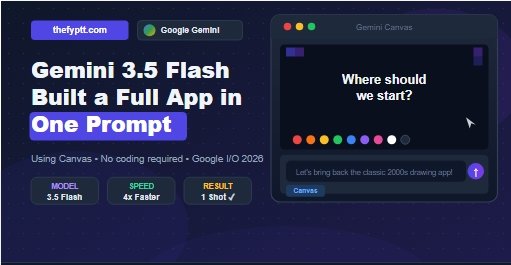
Google has demonstrated something impressive: Gemini 3.5 Flash was asked to recreate the classic early-2000s PC drawing experience and it delivered the complete result in just one shot.

Contents
  • What Happened?
    • What Is Gemini Canvas?
    • Why Gemini 3.5 Flash Makes This Even Better
  • Real-World Examples of What Canvas Can Build
  • How to Try Canvas Yourself
    • What This Means for Creators and Developers
    • Quick Summary
  • What Would You Build?

The official Gemini App account shared this on X, showcasing exactly how powerful the new Canvas feature has become.

We asked Gemini 3.5 Flash to bring back the classic early-2000s PC drawing experience, and it delivered in one shot.

What are you building first with Canvas?

— Google Gemini (@GeminiApp) June 8, 2026

What Happened?

Google’s team typed a simple prompt into Gemini with Canvas enabled:

“Let’s bring back the classic early-2000s PC drawing experience!”

One prompt. One response. A fully functional, interactive drawing app built by AI, instantly.

No coding. No designer. No back-and-forth. Just a single sentence.

What Is Gemini Canvas?

Canvas is Gemini’s interactive workspace a side-by-side editor that lets you create, refine, and build things using AI in real time. It’s available inside the Gemini app under the Tools menu.

With Canvas, you can:

  • Build apps and tools from a single text prompt no coding required
  • Draft and edit long-form content in a document-style interface
  • Create interactive dashboards from raw data
  • Build quizzes, study tools, and flashcards for learning
  • Save and share your creations apps built in Canvas can even be saved as shortcuts on your phone

According to Google’s own release notes, you can now build fully functional personalized apps in Canvas that can use Gemini-powered features, save data between sessions, and share data between multiple users.

Why Gemini 3.5 Flash Makes This Even Better

The model powering this demo was Gemini 3.5 Flash Google’s newest and most capable Flash-tier model, launched at Google I/O 2026 on May 19, 2026.

Here’s what makes it stand out:

  • Gemini 3.5 Flash surpasses last year’s Gemini 3.1 Pro on coding, agentic, and multimodal benchmarks — and runs 4x faster than other frontier models.
  • It is now the default model powering the Gemini app, Google Search AI Mode, and Vertex API
  • It supports up to 2 million tokens of context and native multimodal input including video and audio in a single request.

In simple terms: it’s smarter, faster, and better at building things than any previous Flash model.

Real-World Examples of What Canvas Can Build

People have already been using Canvas to build some remarkable things:

  • Personal finance trackers with charts and calculations
  • Travel planning apps with interactive maps and itineraries
  • 3D models and visualizations
  • Flashcard and quiz apps for studying
  • Drawing tools — like the early-2000s PC demo above
  • Business dashboards with real-time data

One guide tested building 12 games and apps with Canvas, and Gemini delivered the most complete result on the first try compared to ChatGPT and Claude.

How to Try Canvas Yourself

Getting started with Gemini Canvas is simple:

  1. Open the Gemini App (gemini.google.com or the mobile app)
  2. Click Tools in the sidebar or bottom menu
  3. Select Canvas
  4. Type your idea describe what you want to build
  5. Gemini builds it live in the right-side panel
  6. Refine it using plain English no code needed

A Google AI Pro subscription gives access to the more powerful model options, but the basic Canvas experience is available to free users as well.

What This Means for Creators and Developers

The ability to build a full app in one prompt is a turning point. Here’s why it matters:

  • Freelancers can prototype client apps in minutes instead of days
  • Small businesses can build custom tools without hiring developers
  • Students can create interactive study apps tailored to their curriculum
  • Content creators can build mini-tools or games to embed on their websites
  • Everyone can now bring ideas to life without learning to code

Quick Summary

FeatureDetail
ToolGemini Canvas
Model UsedGemini 3.5 Flash
LaunchedGoogle I/O 2026 (May 19, 2026)
DemoClassic PC drawing app — built in 1 prompt
Key CapabilityBuild full apps with no coding required
AccessGemini App → Tools → Canvas
Advanced OptionGoogle AI Pro plan

What Would You Build?

If you could build any app in one sentence, what would it be? Drop your idea in the comments — and try it in Canvas yourself!

TAGGED:AI App BuilderAI Tools 2026Artificial IntelligenceFYPGemini 3.5 FlashGemini CanvasGoogle GeminiGoogle I/O 2026No CodeTech News

Sign Up For Daily Newsletter

Be keep up! Get the latest breaking news delivered straight to your inbox.
[mc4wp_form]
By signing up, you agree to our Terms of Use and acknowledge the data practices in our Privacy Policy. You may unsubscribe at any time.
Share This Article
Facebook Copy Link Print
Previous Article google-gemini-omni-text-rendering-ai-video Google’s Gemini Omni Can Now Render Accurate Text Inside AI-Generated Videos
Next Article claude-fable-5-now-available-google-cloud Anthropic Claude Fable 5 Is Now Live on Google Cloud Here’s What You Need to Know
Leave a Comment

Leave a Reply Cancel reply

Your email address will not be published. Required fields are marked *

FacebookLike
XFollow
PinterestPin
InstagramFollow
Most Popular
fine-tune-gemma-4-12b-locally-8gb-vram-chess
Fine-Tune Gemma 4 12B Locally on 8GB VRAM Chess AI Example
June 15, 2026
keyword-rank-checker-google-rankings-2026
How to Use a Keyword Rank Checker to Improve Google Rankings and Organic Traffic in 2026
June 15, 2026
claude-fable-5-now-available-google-cloud
Anthropic Claude Fable 5 Is Now Live on Google Cloud Here’s What You Need to Know
June 10, 2026
gemini-3-5-flash-canvas-build-app-one-prompt
Google Gemini 3.5 Flash Just Built a Classic PC Drawing App In One Single Prompt
June 9, 2026
google-gemini-omni-text-rendering-ai-video
Google’s Gemini Omni Can Now Render Accurate Text Inside AI-Generated Videos
June 5, 2026

You Might Also Like

google-gemini-omni-ai-agent-2026
Tech News

Google Gemini Omni Is Becoming an AI Agent Can Combine Text, Images, and Videos

3 Min Read
google-i-o-2026-agenda-is-here-mark-your-calendar-for-may-19-20
Tech News

Google I/O 2026 Agenda Is Here Mark Your Calendar for May 19 & 20

2 Min Read
google-ai-studio-mobile-app-2026
AI NewsTech News

Google AI Studio Is Going Mobile And It Can Now Build Full Android Apps From a Single Prompt

6 Min Read
openai-launches-gptrealtime2-for-advanced-realtime-voice-ai
AI News

OpenAI Launches GPT‑Realtime‑2 for Advanced Realtime Voice AI

2 Min Read
Blog

FypTT is your go-to hub for SEO, digital marketing, and website tools. We share practical guides, expert tips, and smart resources to help you improve rankings, drive traffic, and build a stronger online presence.

Categories

  • Web Development
  • SEO Professionals
  • Digital Marketing
  • Write for Us
  • SEO Tools
  • How To

Quick Links

  • Terms of Service
  • Privacy Policy
  • Content Us
  • About US
  • FypTT
  • Blogs
Welcome Back!

Sign in to your account

Username or Email Address
Password

Lost your password?