


You Can Now Fine-Tune Google’s Gemma 4 12B AI Model On a Regular Gaming PC
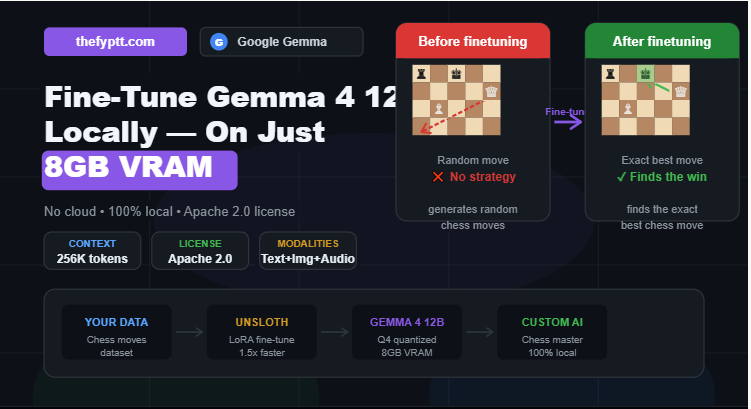
Google’s official Gemma account just highlighted a remarkable community project: someone fine-tuned Gemma 4 12B to master chess running entirely locally on just 8GB of VRAM.
This is the kind of thing that used to require expensive cloud servers or research lab hardware. Now it fits on a mid-range gaming GPU.
What Did the Project Show?
The community project demonstrated a simple but powerful concept: fine-tuning an AI model on your own data, 100% locally, without sending anything to the cloud.
The before-and-after results were striking:
Before Fine-Tuning: Gemma 4 12B generates random chess moves it has no understanding of chess strategy or rules.
After Fine-Tuning: The model finds the exact best chess move consistently and accurately.
The same model. The same hardware. The only difference was fine-tuning on custom chess data.
Google’s Gemma team noted: “Running text, images, and audio on just 8GB VRAM makes custom models more accessible than ever.”
What Is Gemma 4 12B?
Gemma 4 12B was released on June 3, 2026 by Google DeepMind under an Apache 2.0 license meaning it is free to use, modify, and even deploy commercially.
It is an encoder-free, unified multimodal model that accepts text, images, and native audio as input, with a 256K-token context window and support for 140 languages.
At Q4KM quantization, it needs only about 6.6 GB of VRAM, meaning it fits comfortably on an 8GB GPU.
In short: it is a powerful, open-weight AI model that runs on hardware most developers and enthusiasts already own.
How Does Fine-Tuning Work?
Fine-tuning means taking a pre-trained AI model and training it further on a specific dataset to make it good at a particular task.
Think of it like this: Gemma 4 12B already knows how to understand language. Fine-tuning teaches it to apply that understanding to a specific domain in this case, chess moves.
The tools that make this possible on consumer hardware include:
- Unsloth trains Gemma 4 approximately 1.5x faster with around 60% less VRAM than standard setups, with no accuracy loss.
- LoRA (Low-Rank Adaptation) a technique that fine-tunes only a small portion of the model’s weights, dramatically reducing memory requirements
- GGUF quantization compresses the model weights so the full model fits in limited VRAM
Gemma 4 E2B, the smallest variant, can even be fine-tuned on just 8GB VRAM using LoRA.
What Hardware Do You Need?
The great news is that you do not need expensive equipment. Here is what works:
| GPU VRAM | What You Can Run |
| 8GB (e.g. RTX 3070, 4060) | Gemma 4 12B at Q4 quantization |
| 12–16GB | Gemma 4 12B at higher quality (Q8) |
| 24GB+ | Gemma 4 26B or 31B models |
Gemma 4 12B runs on 8GB RAM at 4-bit quantization, or 14GB at 8-bit.
Most mid-range gaming GPUs from the last 3–4 years can handle this.
Why This Matters for Everyone
This chess project is just one example. The real significance is what it represents for AI accessibility.
Fine-tuning used to require:
- Thousands of dollars in cloud computing
- Access to research-grade hardware
- Deep machine learning expertise
Now, with Gemma 4 12B and tools like Unsloth, you can:
- Fine-tune on your own private data nothing leaves your machine
- Build a custom AI for your specific use case customer support, coding, writing, games
- Run it locally no API costs, no internet required, no data privacy concerns
- Do it on a gaming PC no specialized hardware needed
What Could You Fine-Tune Gemma On?
The possibilities are wide open:
- Your business documents build a custom assistant that knows your company inside out
- A specific programming language or framework make it an expert in your tech stack
- Medical or legal texts domain-specific knowledge without sending data to third parties
- A language or dialect fine-tune for regional language support
- Games and simulations like the chess example above
- Your own writing style a personal AI that writes exactly like you
How to Get Started
If you want to try fine-tuning Gemma 4 12B yourself:
- Download the model run ollama run gemma4:12b (about 7.6GB download) or grab it from Hugging Face
- Prepare your dataset collect examples of inputs and desired outputs for your task
- Use Unsloth visit unsloth.ai for ready-made fine-tuning notebooks that work in Google Colab or locally
- Choose LoRA fine-tuning this is the most memory-efficient method for 8GB VRAM
- Train and test fine-tuning a small dataset can take minutes to hours depending on your GPU
Quick Summary
| Detail | Info |
| Model | Gemma 4 12B |
| Developer | Google DeepMind |
| Released | June 3, 2026 |
| License | Apache 2.0 (free, commercial use OK) |
| Min VRAM for Inference | ~6.6GB (Q4 quantization) |
| Min VRAM for Fine-Tuning | 8GB (with LoRA + Unsloth) |
| Context Window | 256K tokens |
| Modalities | Text, Image, Audio |
| Fine-Tune Tool | Unsloth (recommended) |
What Would You Build?
If you could fine-tune an AI on any dataset, what would you teach it? Drop your idea in the comments!