


Picture this: You’ve spent countless hours building a beautiful, functional website, optimizing content, and implementing SEO strategies. But despite all that effort, your site isn’t ranking as well as you hoped. If this sounds like you, there’s a good chance your website’s page speed is the culprit.
- What Are Core Web Vitals and Why Do They Matter?
- Is Page Speed a Google Ranking Factor?
- How Page Speed Affects SEO and Rankings
- What Happens When Your Site Doesn’t Meet Core Web Vitals Standards?
- How to Measure Page Speed and Core Web Vitals Performance
- How to Improve Your Website’s Page Speed and Core Web Vitals
- Ongoing Page Speed Optimization Best Practices
- Conclusion
In 2020, Google rolled out Core Web Vitals, a set of metrics that determine the quality of the user experience on your site. These metrics focus on performance, particularly page speed, and they play a crucial role in Google’s ranking algorithm. But the real question is: Is page speed really a Google ranking factor in Core Web Vitals? And more importantly, how can you improve your site’s performance to climb the rankings?
In this article, we’ll dive deep into Core Web Vitals, break down how page speed influences your SEO, and provide actionable tips to help you optimize your website’s performance for better search engine rankings. Whether you’re new to web development or a seasoned pro, this guide will help you understand the importance of Core Web Vitals and how to boost your website’s page speed.
What Are Core Web Vitals and Why Do They Matter?
When it comes to user experience, Google wants to ensure that websites are fast, responsive, and stable. That’s where Core Web Vitals come into play. These are a set of user-centric metrics that Google uses to evaluate the performance of a website.
Let’s break them down:
Largest Contentful Paint (LCP)
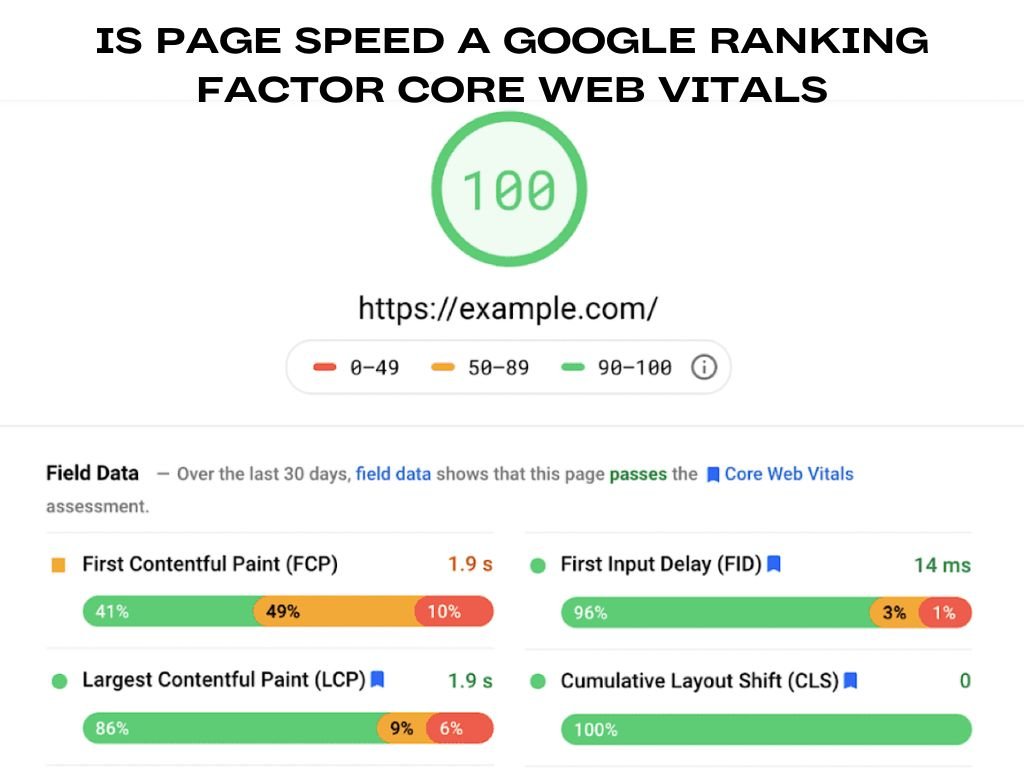
LCP measures how long it takes for the largest element on the screen (usually an image, video, or a block of text) to load. This metric tells us how long it takes for the user to see the majority of the content on the page. Ideally, LCP should be under 2.5 seconds for a fast and user-friendly experience. If your LCP time exceeds this threshold, users may start feeling frustrated, and Google will consider your website’s performance as subpar.
First Input Delay (FID)
FID measures how long it takes for your website to respond when a user interacts with it for the first time. This could be clicking a button, typing in a search box, or tapping on a menu. Ideally, your FID should be under 100 milliseconds. If the delay is longer, users might think the website is unresponsive or broken, leading them to abandon the page.
Cumulative Layout Shift (CLS)
CLS measures the visual stability of a webpage as it loads. If elements on your page shift unexpectedly (e.g., images, buttons, or text), it can create a frustrating user experience. CLS should be under 0.1 to ensure the page loads in a stable and predictable manner.
These three metrics LCP, FID, and CLS are the heart of Core Web Vitals. Google now considers these as critical ranking factors. But how do they affect your rankings and why should you care? Let’s dive into the next section.
Is Page Speed a Google Ranking Factor?
If you’ve been following SEO trends in recent years, you’ve probably heard that page speed is a Google ranking factor. Well, it’s true. Page speed does impact how well your website ranks on Google, and Google has made it clear that they value websites that provide a fast, seamless user experience.
Why Does Page Speed Matter for SEO?
When users land on your site, they expect it to load quickly. Google, being the ultimate authority on search, wants to ensure that websites with slow load times don’t rank high in the search results. Here’s why page speed is so crucial:
- User Experience: A slow website frustrates users. If your website takes too long to load, users will bounce (leave) before they even get to interact with your content. Google tracks bounce rates and uses them as a signal to rank pages.
- Mobile Users: Mobile-first indexing means that Google primarily uses the mobile version of your website for ranking. Since mobile devices often have slower connections, page speed becomes even more important on mobile than it is on desktop.
- Higher Engagement: A fast website encourages users to stay longer and engage with your content. A smooth and fast-loading page increases the chances of users clicking through other pages on your site, increasing engagement metrics like time on site and page views.
How Page Speed Affects SEO and Rankings
Google uses several factors to determine your website’s ranking, and page speed plays a vital role. With Google’s emphasis on Core Web Vitals, it’s safe to say that faster websites rank higher.
User Behavior and SEO Impact
- Bounce Rate: A slow website can lead to higher bounce rates. Studies have shown that for every second your website takes to load, the bounce rate increases by 32%. Google sees high bounce rates as a sign of poor user experience, which negatively impacts your SEO.
- Session Duration: A faster website encourages users to stay longer and explore more pages. Longer sessions signal to Google that your website is engaging, which can improve your rankings.
- Mobile Rankings: With mobile-first indexing, Google prioritizes the mobile version of your site. A slow mobile website not only frustrates users but also damages your chances of ranking well.
The Direct Correlation Between Page Speed and Google Rankings
Research consistently shows that faster websites tend to rank higher on Google. In fact, Google’s official blog states that page speed is a critical factor in how websites are ranked. Pages that load quickly provide a better user experience, and Google rewards these sites with better rankings.
The bottom line: if your site is slow, it’s hurting your SEO efforts. But don’t worry there are plenty of strategies to optimize your site and boost your page speed.
What Happens When Your Site Doesn’t Meet Core Web Vitals Standards?
If your website fails to meet the minimum standards for Core Web Vitals, you’re at risk of lower rankings on Google. Here’s what can happen:
Negative Impact on Rankings
Google uses Core Web Vitals as part of its ranking algorithm, meaning that websites that fail to meet these standards may get penalized. If your site has poor LCP, FID, or CLS scores, Google may demote your pages in the search results, causing you to lose valuable organic traffic.
Increased Bounce Rates
A slow, unstable website leads to higher bounce rates. Users are less likely to stay on a site that’s slow or experiences layout shifts during loading. If users leave quickly, Google sees this as a negative signal, which can further hurt your SEO rankings.
Poor Conversion Rates
Page speed also affects conversion rates. If your website is slow to load, users are less likely to engage with your content or complete conversions, such as signing up for a newsletter, purchasing a product, or downloading a resource.
How to Measure Page Speed and Core Web Vitals Performance
Now that we’ve covered the importance of Core Web Vitals, it’s time to measure how your site performs.
| Tool | Description |
|---|---|
| Google PageSpeed Insights | Provides a detailed report of your website’s LCP, FID, and CLS scores, along with suggestions for improvement. It helps identify areas to optimize page performance. |
| Lighthouse | A powerful tool integrated into Chrome DevTools that helps evaluate your website’s performance based on Core Web Vitals and offers actionable suggestions for improvement. |
| GTmetrix | Provides a comprehensive analysis of your page’s performance, including Core Web Vitals scores, and offers specific recommendations for optimization. |
| Fyptt | A tool that helps analyze your website’s speed and performance, offering insights into how to optimize for Core Web Vitals and improve overall user experience. |
Interpreting Core Web Vitals Scores
| Core Web Vitals Metric | Ideal Score | Description |
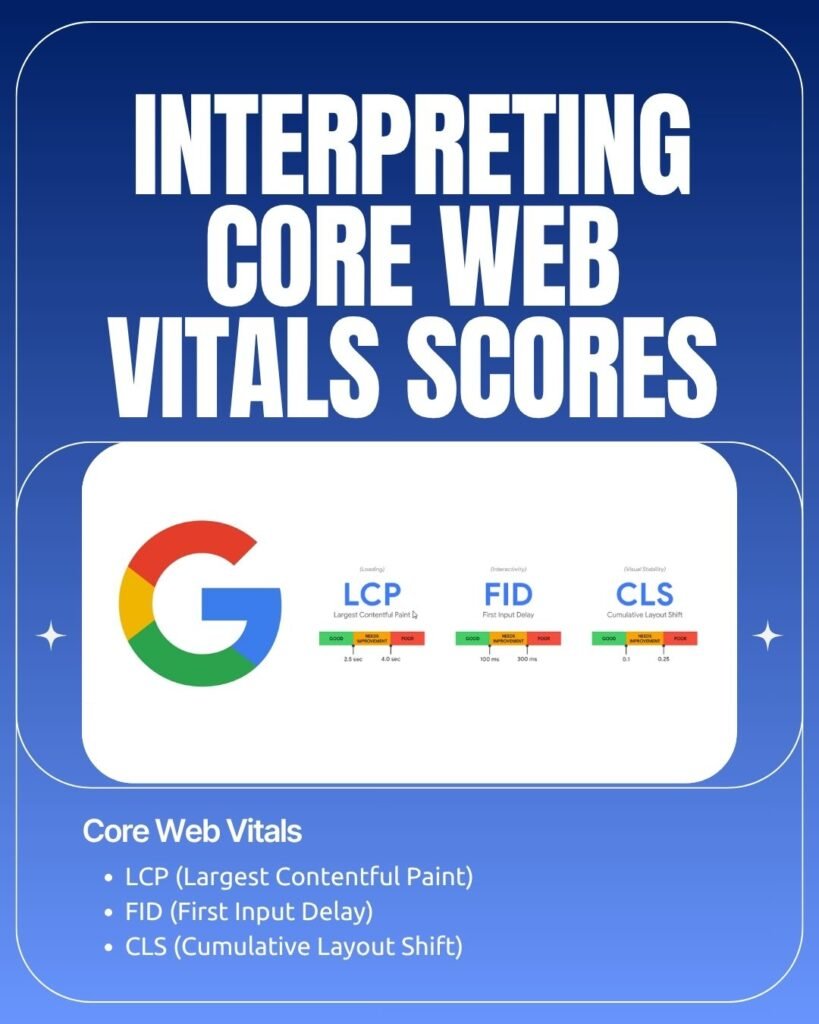
| LCP (Largest Contentful Paint) | Less than 2.5 seconds | Measures loading performance. A high LCP indicates that users have to wait longer for content to appear. |
| FID (First Input Delay) | Less than 100 milliseconds | Measures interactivity. A high FID indicates that the website is slow to respond to user interactions like clicks or typing. |
| CLS (Cumulative Layout Shift) | Less than 0.1 | Measures visual stability. A high CLS indicates unexpected layout shifts during page load, which negatively impacts the user experience. |
By monitoring and improving these metrics, you can create a better user experience and improve your SEO rankings.
How to Improve Your Website’s Page Speed and Core Web Vitals
Now that you understand the importance of Core Web Vitals and page speed, it’s time to optimize your website. Here’s how you can improve your website’s performance.
| Optimization Category | Strategy | Description |
| 1. Optimize Largest Contentful Paint (LCP) | Image Optimization | Compress large images using tools like TinyPNG or ImageOptim. Use modern formats like WebP to reduce file sizes without sacrificing quality. |
| Lazy Loading | Implement lazy loading for off-screen images, videos, and other media. This delays the loading of elements until the user scrolls to them, reducing initial load time. | |
| Server Improvements | Host your website on a fast and reliable server. Ensure your server is optimized for fast response times by using HTTP/2 and leveraging CDNs (Content Delivery Networks). | |
| 2. Reduce First Input Delay (FID) | JavaScript Optimization | Minimize JavaScript execution time by breaking up large scripts into smaller chunks and using async and defer attributes for non-essential scripts. |
| Prioritize Critical Scripts | Load essential scripts first and defer less important ones to improve interactivity. | |
| 3. Minimize Cumulative Layout Shift (CLS) | Size Images and Videos | Always specify the width and height for images and videos to prevent layout shifts. |
| Avoid Dynamic Content Above the Fold | Don’t dynamically insert content like ads or banners above the fold, as this can cause unexpected shifts during loading. | |
| Use CSS for Stability | Use CSS to ensure that elements like fonts and buttons remain stable during page load. | |
| 4. General Page Speed Optimization Tips | Enable Caching | Caching reduces the amount of time it takes to load a page by storing static files on the user’s device. Use browser caching and server-side caching to improve load times. |
| Minify CSS, JavaScript, and HTML | Remove unnecessary spaces, comments, and characters from your code to reduce file sizes. | |
| Use a Content Delivery Network (CDN) | CDNs distribute your content across multiple servers around the world, making your website load faster for users no matter where they are. |
Ongoing Page Speed Optimization Best Practices
Page speed optimization isn’t a one-time task; it requires ongoing effort to maintain fast and efficient performance.
Regular Monitoring
Set up automated performance checks to ensure your website stays fast. Use tools like Google PageSpeed Insights to run tests regularly and keep track of your Core Web Vitals scores.
Adapt to Google’s Algorithm Updates
Google’s algorithms are constantly evolving, and so are the standards for Core Web Vitals. Stay updated with Google’s guidelines to ensure your website continues to meet performance expectations.
Frequently Asked Questions (FAQs)
1. What are Core Web Vitals and how do they impact SEO?
Core Web Vitals are a set of metrics that measure the user experience of a website. They are used by Google as ranking factors to determine how fast and stable a page is.
2. How can I improve my website’s Core Web Vitals scores?
You can improve your scores by optimizing images, reducing JavaScript execution time, minimizing layout shifts, and improving server response times.
3. Why is page speed important for SEO?
Page speed affects user experience, bounce rates, and engagement, all of which impact SEO rankings. Faster websites rank higher because they provide better experiences for users.
4. What tools can I use to measure Core Web Vitals?
You can use tools like Google PageSpeed Insights, Lighthouse, and GTmetrix to measure your website’s Core Web Vitals performance.
Conclusion
Page speed and Core Web Vitals are not just technical details they are essential components of SEO. By optimizing for these metrics, you can improve your site’s user experience, reduce bounce rates, and boost your rankings on Google. Implementing the tips shared in this guide will help you create a faster, more engaging website that not only performs well in search engines but also provides a seamless experience for your users.