

Blog
  • Beginner’s Guides
  • Digital Marketing
  • SEO Professionals
  • Web Development
  • Accessibility
  • Testing
Reading: Claude in Chrome Now Syncs Across Desktop, Web, and Mobile as a Full Cowork Session
Share
BlogBlog
Font ResizerAa
  • Complaint
  • Complaint
  • Advertise
  • Advertise
Search
  • Categories
    • Lifestyle
    • Wellness
    • Healthy
    • Nutrition
  • Categories
    • Lifestyle
    • Wellness
    • Healthy
    • Nutrition
  • More Foxiz
    • Blog Index
    • Complaint
    • Sitemap
    • Advertise
  • More Foxiz
    • Blog Index
    • Complaint
    • Sitemap
    • Advertise
Follow US
Copyright © 2014-2023 Ruby Theme Ltd. All Rights Reserved.
Home » Blog » Claude in Chrome Now Syncs Across Desktop, Web, and Mobile as a Full Cowork Session
claude-in-chrome
AI NewsTech News

Claude in Chrome Now Syncs Across Desktop, Web, and Mobile as a Full Cowork Session

Emily Parrr
By Emily Parrr
Last updated: August 13, 2026
4 Min Read
SHARE

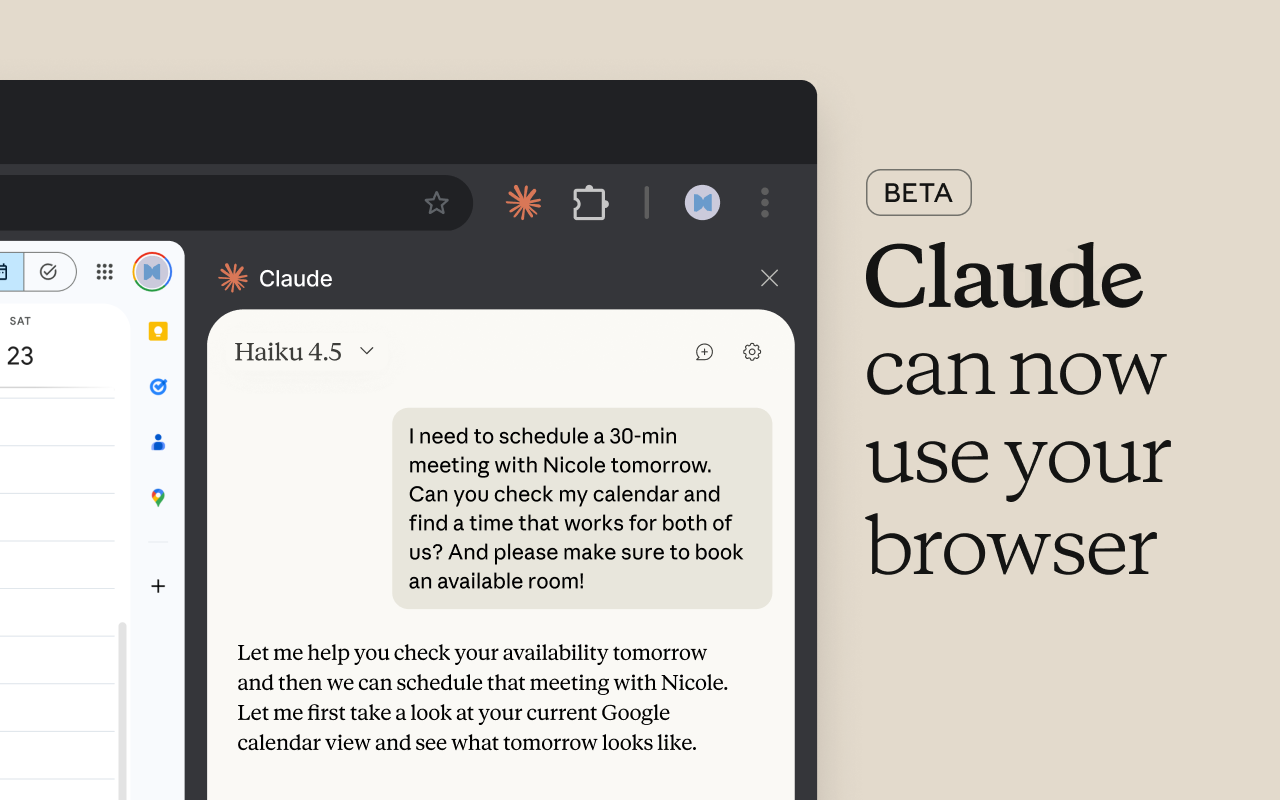
Anthropic has rebuilt its Claude in Chrome browser extension so that sessions started in the side panel are no longer stuck in a single tab. Conversations are now saved to a user’s history, skills and connectors work directly in the browser, and a task started in a tab can be picked up and finished on the Claude desktop, web, and mobile apps.

Contents
  • From an Isolated Tool to a Full Cowork Client
  • What Claude in Chrome Can Do
    • Availability
    • Security Considerations
  • How to Get Started

From an Isolated Tool to a Full Cowork Client

Your Claude in Chrome sessions now carry over to desktop, web, and mobile. Conversations are saved, and your skills and connectors work in the browser.

Available on Max and Team today, rolling out to Pro in the coming weeks. pic.twitter.com/Hnxs18PVI8

— Claude (@claudeai) August 12, 2026

Conversations started in the side panel are now saved to Claude history and can be resumed from the Claude desktop, web, and mobile apps, with skills and connectors already configured for an account working from the browser without additional setup. The side panel now runs the same underlying Claude Cowork session as the desktop, web, and mobile apps, meaning sessions live with a user’s account rather than on any single device.

Previously, side panel sessions were effectively their own separate product. Conversations stayed in the browser, skills and connectors did not follow, and switching to the desktop app meant starting the task over from scratch.

What Claude in Chrome Can Do

Claude in Chrome lets Claude see the page a user is on and take actions in it, including clicking links, typing text, navigating between pages, and filling out forms, using the person’s existing logins. This is particularly useful for tools that don’t connect directly to Claude, such as internal dashboards, legacy systems, and vendor portals.

Anthropic’s example use case involves asking Claude to collect invoice details from several vendor portals, build a spreadsheet, then continue the same session on desktop to add local files or compare the results with a previous budget.

Availability

The update is available on Max and Team plans today, and is rolling out to Pro users over the coming weeks. According to reporting on the rollout, Enterprise works differently: the feature stays off by default there, with admins responsible for switching it on. Claude in Chrome does not yet run on other Chromium-based browsers or on mobile.

Security Considerations

Browser-based AI agents carry inherent risks, and Anthropic has been upfront about them. Anthropic has stated that Claude in Chrome carries the same risks as any AI agent that acts in a browser, chiefly prompt injection, where a malicious actor hides instructions for the agent inside a webpage. A separate check reviews consequential actions when automatic approval is enabled, while Claude still asks before actions such as purchases or sharing personal data, though Anthropic says these safeguards reduce risk but cannot eliminate it entirely.

How to Get Started

Users can enable Claude in Chrome from the Claude desktop app by opening Settings, toggling on the Claude in Chrome connector, and installing the extension. Once enabled, it appears in the Connectors dropdown for conversations, though it must be turned on manually per conversation since it’s disabled by default.


TAGGED:AI AgentsAI NewsAnthropicBrowser ExtensionChrome ExtensionClaude AIClaude CoworkClaude in ChromeProductivity Tools

Sign Up For Daily Newsletter

Be keep up! Get the latest breaking news delivered straight to your inbox.
[mc4wp_form]
By signing up, you agree to our Terms of Use and acknowledge the data practices in our Privacy Policy. You may unsubscribe at any time.
Share This Article
Facebook Copy Link Print
Previous Article gemma-4-hackathon-sidebar Google Gemma Spotlights “Sidebar”: A Gemma 4 Hackathon Project That Turns Meetings Into Working Prototypes
Next Article google-backs-agent-plugins Google Backs Agent Plugins: A New Open Standard for Packaging Agent Skills and MCP Servers
Leave a Comment

Leave a Reply Cancel reply

Your email address will not be published. Required fields are marked *

FacebookLike
XFollow
PinterestPin
InstagramFollow
Most Popular
google-analytics-user-metrics
Google Analytics Breaks Down Total, New, Active, and Returning Users: What Each Metric Really Means
August 14, 2026
google-backs-agent-plugins
Google Backs Agent Plugins: A New Open Standard for Packaging Agent Skills and MCP Servers
August 13, 2026
claude-in-chrome
Claude in Chrome Now Syncs Across Desktop, Web, and Mobile as a Full Cowork Session
August 13, 2026
gemma-4-hackathon-sidebar
Google Gemma Spotlights “Sidebar”: A Gemma 4 Hackathon Project That Turns Meetings Into Working Prototypes
August 7, 2026
google-analytics-annotations
Google Analytics Highlights Annotations: Add Context to Your Campaign History Directly on GA4 Reports
August 4, 2026

You Might Also Like

claude-ai-writes-80-percent-anthropic-code-productivity-8x
AI NewsTech News

Claude AI Now Writes 80% of Anthropic’s Code And It’s Getting Faster Every Month

4 Min Read
claude-ai-spacex-compute-partnership
AI NewsTech News

Claude AI Partners with SpaceX to Supercharge Compute Capacity

3 Min Read
capcut-google-gemini-partnership-2026
AI NewsAI Tools

CapCut Is Partnering With Google Gemini Edit Images and Videos Directly Inside Gemini App

3 Min Read
openai-launches-gptrealtime2-for-advanced-realtime-voice-ai
AI News

OpenAI Launches GPT‑Realtime‑2 for Advanced Realtime Voice AI

2 Min Read
Blog

FypTT is your go-to hub for SEO, digital marketing, and website tools. We share practical guides, expert tips, and smart resources to help you improve rankings, drive traffic, and build a stronger online presence.

Categories

  • Web Development
  • SEO Professionals
  • Digital Marketing
  • Write for Us
  • SEO Tools
  • How To

Quick Links

  • Terms of Service
  • Privacy Policy
  • Content Us
  • About US
  • FypTT
  • Blogs
Welcome Back!

Sign in to your account

Username or Email Address
Password

Lost your password?