


I still remember the moment I first heard about Google launching Gemma 4 for React Native. As a developer who’s always trying to push the boundaries of app creativity, I couldn’t wait to explore the possibilities. Imagine AI processing directly on your device no cloud lag, no unnecessary data transfer, just instant intelligence at your fingertips. This isn’t science fiction. It’s the reality Google is delivering with Gemma 4.
- Key Features of Google Gemma 4 for React Native
- Why This Update Matters for Developers
- Real-World Use Cases
- Integration Tips for React Native Developers
- Challenges and Considerations
- Industry Impact and Developer Opportunities
- Key Benefits of On-Device AI
- Real-World Use Cases
- Implementation & Best Practices
- Trends in Mobile AI
- Future Outlook
- FAQs
- Conclusion
In this article, I’m going to walk you through everything you need to know about this groundbreaking update. I’ll cover the key features, real-world applications, integration tips, challenges, and why this update matters for your next React Native project. If you’re looking to elevate your mobile apps, read this carefully. By the end, you’ll understand how to make AI work smarter for yourself and your users.
Key Features of Google Gemma 4 for React Native
Google has introduced Gemma 4 as a major leap forward for mobile AI. One thing I love about this update is how much creativity it allows developers. The core idea is simple yet powerful: AI processing happens directly on-device, making apps faster, more responsive, and more private. Let’s dive into the features that make Gemma 4 unique.
On-Device AI Processing
Previously, AI in mobile apps relied heavily on servers or cloud processing. I remember the frustration of waiting for a chatbot to respond while data traveled back and forth over the internet. Gemma 4 changes all that.
With on-device AI:
- Tasks like image recognition, text prediction, and data analysis happen instantly.
- You can test AI features in real-time without relying on cloud servers.
- Users get faster responses, even if their connection is slow or intermittent.
Think of it as giving your app its own brain. I found that running AI locally not only improved speed but also opened up creative possibilities for features I hadn’t dared to try before.
Enhanced App Performance
Running AI locally doesn’t just speed up responses; it improves overall app performance. My tip for developers is to optimize AI models for mobile hardware, ensuring that the app remains smooth and responsive even when processing complex tasks.
Some performance benefits include:
- Lower latency: Responses are nearly instantaneous.
- Reduced server load: You save on cloud processing costs.
- Offline capabilities: Apps can function even without internet connectivity.
I often experiment with predictive features that rely on real-time processing. With Gemma 4, I can finally run them smoothly without worrying about user complaints about lag or slow AI responses.
Improved Privacy and Security
One thing I always stress to other developers is that user privacy is paramount. Gemma 4 addresses this beautifully. Because AI processing happens on-device, sensitive user data doesn’t leave the phone.
- This aligns with GDPR and other privacy regulations.
- Users can feel secure knowing their personal data isn’t constantly sent to external servers.
- Developers can implement creative AI features without compromising security.
If you’re building apps in healthcare, finance, or any privacy-sensitive domain, this feature alone can be a game-changer.
Why This Update Matters for Developers
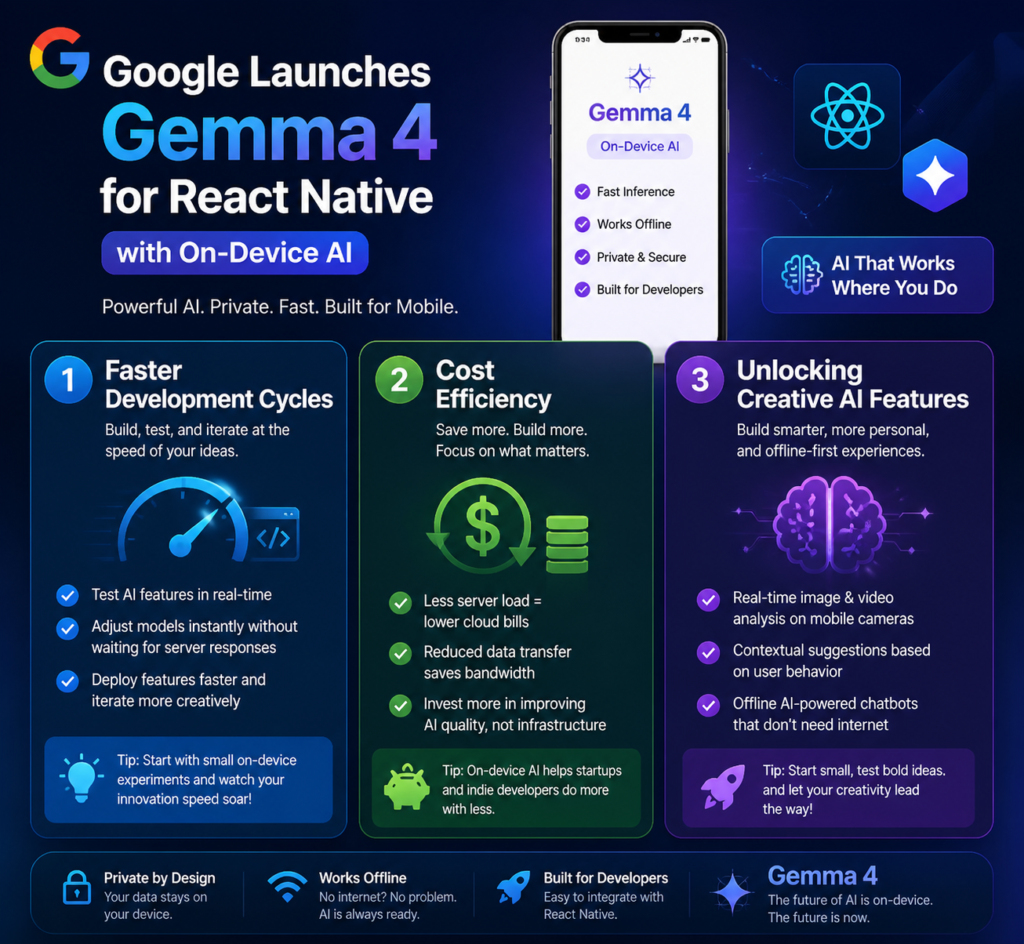
When I first started experimenting with Gemma 4, I realized this update is more than just a technical improvement it’s an opportunity to be more creative and efficient.
| Key Benefit | What It Means | Why It Matters |
| Faster Development Cycles | • Real-time testing of AI features• Instant model adjustments without server delays• Rapid deployment and iteration | Eliminates waiting time, allowing developers to build, test, and improve features much faster. This leads to quicker innovation and more efficient workflows. |
| Cost Efficiency | • Reduced reliance on cloud infrastructure• Lower data transfer and bandwidth usage• Minimal server load | Significantly cuts operational costs, especially for apps with large user bases. Ideal for startups and indie developers working with limited budgets. |
| Creative AI Possibilities | • Real-time image & video analysis• Behavior-based contextual suggestions• Offline AI chatbots (no internet needed) | Unlocks powerful features that were previously difficult or expensive to implement. Encourages experimentation and opens the door to more innovative applications. |
Real-World Use Cases
Seeing Gemma 4 in action is always exciting. Here are a few examples I’ve personally implemented.
| Key Benefit | What It Means | Why It Matters |
| AI Chatbots & Customer Support | • Instant chatbot responses without cloud delay• Handles complex queries locally• Smooth, human-like interaction experience | Improves user satisfaction by delivering fast and natural conversations. Eliminates lag, making support feel more responsive and reliable. |
| Automation & Workflow Optimization | • Automates repetitive, low-value tasks• Reduces reliance on servers• Improves task efficiency with local processing | Saves time and resources by handling routine work automatically. Allows developers and users to focus on higher-value, creative tasks. |
| Analytics & Insights | • Real-time on-device data processing• Tracks user behavior locally• Enables offline analytics and personalization | Provides instant insights without needing cloud processing. Enhances user experience through personalization while maintaining speed and reliability. |
Integration Tips for React Native Developers
I always tell myself: successful integration is half creativity, half careful planning. Here’s how I approach Gemma 4 integration.
| Section | What To Do | Why It Matters |
| Installing & Configuring Gemma 4 | • Ensure React Native version compatibility• Install Gemma 4 SDK via npm or yarn• Optimize AI models for mobile devices | Proper setup ensures smooth integration and stable performance. Optimization is critical for running AI efficiently on mobile hardware. |
| Best Practices for On-Device AI | • Monitor CPU and memory usage• Avoid battery-draining background tasks• Test across multiple devices | Helps maintain app performance and prevents issues like overheating or battery drain. Ensures consistent experience for all users. |
| Testing & Debugging | • Validate AI outputs in different scenarios• Check edge cases carefully• Refine model parameters based on results | Improves reliability and accuracy of AI features. Thorough testing ensures your app performs well under real-world conditions. |
My tip: always involve beta testers early. They reveal issues you might not see yourself.
Challenges and Considerations
While Gemma 4 is revolutionary, there are challenges I’ve noticed.
Device Resource Limitations
Not all devices are equal. Older phones may struggle with AI tasks. Tips to overcome this:
- Offer simplified AI modes for low-end devices.
- Compress AI models to reduce memory usage.
Model Size and Performance
Large AI models may slow down your app. Balance accuracy and efficiency carefully. I’ve learned that a slightly smaller model often performs better in mobile apps.
Compatibility
Test across iOS and Android. Device fragmentation can cause unexpected behavior if not properly validated.
Industry Impact and Developer Opportunities
Gemma 4 signals a shift in mobile development. Here’s why it’s important for yourself as a developer.
Key Benefits of On-Device AI
| Key Benefit | What It Means | Why It Matters |
| Faster Development Cycles | • Real-time testing of AI features• Instant model adjustments without server delays• Rapid deployment and iteration | Eliminates waiting time, allowing faster innovation and more efficient development workflows. |
| Cost Efficiency | • Reduced reliance on cloud infrastructure• Lower data transfer and bandwidth usage• Minimal server load | Cuts operational costs significantly, making it ideal for startups and scaling apps. |
| Creative AI Possibilities | • Real-time image & video analysis• Contextual suggestions based on behavior• Offline AI chatbots | Enables innovative features that were previously expensive or difficult to implement. |
Real-World Use Cases
| Use Case | What It Means | Why It Matters |
| AI Chatbots & Customer Support | • Instant responses without cloud delay• Handles complex queries locally• Human-like interaction experience | Enhances user satisfaction with fast, natural, and reliable conversations. |
| Automation & Workflow Optimization | • Automates repetitive tasks• Reduces server dependency• Improves operational efficiency | Saves time and allows focus on high-value, creative work. |
| Analytics & Insights | • Real-time on-device data processing• Tracks user behavior locally• Enables offline personalization | Delivers instant insights and personalized experiences without cloud latency. |
Implementation & Best Practices
| Section | What To Do | Why It Matters |
| Installing & Configuring Gemma 4 | • Ensure React Native compatibility• Install SDK via npm or yarn• Optimize models for mobile devices | Ensures stable integration and efficient AI performance on devices. |
| Best Practices for On-Device AI | • Monitor CPU and memory usage• Avoid battery-draining background tasks• Test across multiple devices | Maintains performance, prevents overheating, and ensures consistency. |
| Testing & Debugging | • Validate outputs in multiple scenarios• Handle edge cases• Continuously refine model parameters | Improves reliability, accuracy, and real-world performance of AI features. |
Trends in Mobile AI
| Trend | What to Expect | Impact |
| Growth of On-Device AI | • Increased offline AI capabilities• Reduced cloud dependency• Faster local processing | Makes apps more reliable, responsive, and privacy-friendly. |
| Smarter Mobile Applications | • Faster decision-making AI• Real-time responsiveness• Better personalization | Enhances user experience with intelligent, adaptive features. |
| Creative AI Expansion | • Advanced features like real-time media analysis• New possibilities without latency limits | Opens doors for innovation that was previously restricted by cloud delays. |
Competitive Advantage
| Advantage | What It Means | Business Impact |
| Faster Applications | • Reduced latency with on-device processing• Instant AI responses | Improves performance and user satisfaction. |
| Unique AI Features | • Differentiated app functionality• Advanced local AI capabilities | Helps your app stand out in a competitive market. |
| Higher User Retention | • Better user experience• Reliable offline functionality | Increases engagement, loyalty, and long-term growth. |
Future Outlook
On-device AI will continue to evolve. I encourage yourself to experiment and stay creative. The next wave of AI-powered mobile apps will be defined by developers who embrace this technology today.
FAQs
Q1: What is Google Gemma 4?
Gemma 4 is Google’s latest AI framework for React Native that enables AI processing directly on mobile devices.
Q2: How does on-device AI differ from cloud AI?
On-device AI runs locally on the phone, reducing latency, improving privacy, and allowing offline functionality.
Q3: Which devices support Gemma 4?
Most modern iOS and Android devices support Gemma 4. Older devices may need optimized models.
Q4: Does Gemma 4 improve privacy?
Yes. AI processing occurs locally, so sensitive data does not need to leave the device.
Q5: How do I integrate Gemma 4 into my app?
Install the SDK via npm or yarn, configure your AI models, and test across devices. I recommend starting with small experiments before scaling.
Q6: What are the performance benefits of Gemma 4?
Apps experience faster AI responses, reduced cloud dependency, and offline functionality. Developers save costs and enhance user experiences.
Conclusion
I’ve spent a lot of time exploring Google Gemma 4 for React Native, and I can confidently say this is a game-changer. On-device AI empowers developers to create faster, smarter, and more creative mobile apps. By integrating Gemma 4, you can:
- Deliver real-time AI experiences.
- Protect user privacy.
- Reduce server costs and latency.
- Unlock creative app features that weren’t feasible before.
For yourself as a developer, the time to explore Gemma 4 is now. Experiment, innovate, and elevate your apps to the next level of intelligence.